
【Service Information】
24H emergency medical consultation
【Japan Consultation】
Japan Online Medical Consultation
【Account FAQs】
【Technical Support】
FAQ / Account FAQs
Member account
Q What should I do if I forgot my password?
- enter the registered phone number or email address, and follow the instructions to retrieve your account and password.
- If you are a sub-account of an IC Care VIP member and did not previously verify a phone number or email address, you can ask the IC Care VIP main account to modify your information by going to "My account"→"Family Group"→"Setting".
Q How can I check what is my current membership type?
You can check your current membership and other information in the "My account" → "Basic Info" tab. The "History" tab allows you to check the end date of your VIP membership plan.
Q What are the benefits of binding social media? How can I use social media to log in to IC Care quickly?
Linking your IC Care account with your LINE account allows you to log in quickly without entering your account and password.
How to bind a social media account:
- If you choose to log in with a social media account during registration, your account is already linked. Simply select that social media account to log in quickly. If you want to add another platform, go to "My Account" → "Bind Social Account" ,choose the desired social media platform to link, and you can log in quickly by selecting that platform.
- If you registered directly (without choosing a social media account), go to "My Account" → "Bind Social Account" choose the desired social media platform to bind, and you can log in quickly by selecting that platform.
Q Why does a notification appear asking for my valid name and phone number when I log in with LINE for the first time?
To ensure you can use certain IC Care services, including prescriptions and medication delivery, we require you to provide a valid name (matching your ID/passport/residence permit) and phone number. Even if you choose to log in quickly with LINE, IC Care still needs you to fill out your valid name and phone number the first time you log in. This ensures we can provide you with complete services.
Q Can I register and use IC Care services anonymously or with a nickname?
IC Care provides consultation and prescription services according to relevant regulations, which require prescriptions to include the patient's name, age, and gender. If the information on the prescription is incorrect, you will not be able to use it to purchase medication at a pharmacy.
Please provide the name and correct birthdate as shown on a valid ID (national ID/foreign passport). If you did not fill it out during registration, you can do so in "My Account" → "Basic Info," then click "Confirm" after verifying the correct information.
Q Can users under 18 use this service?
可以,但尚未滿法定年齡,部分付費服務會有限制。像是購買24小時緊急醫療諮詢次數、周邊商品、藥物寄送或特診等,都需要由法定代理人協助。
Q Is it necessary to fill out the Health Book?
健康存摺不是強制性的,您可以根據自己的需求選擇填寫健康存摺的內容。
完全根據您的意願進行。所有存入健康存摺的資料都只會儲存在您的帳號中。在您諮詢時,這些資料系統將提供給醫師進行評估,幫助他們更全面地了解您的病情和需求,提供更精準的診斷和治療方案。
此外,如果您手邊有其他想提供醫師參考的檔案,也可以輕鬆上傳至健康存摺的檔案區,讓醫師在診斷過程中獲得更多參考資料,提供更全面的治療建議。
Redeem Voucher
Q What should I do if the voucher code shows "Redemption Failed"?
If you encounter a redemption failure while entering the redemption code, the following could be possible reasons:
- Incorrect code entry: Double-check the voucher code you entered for accuracy, paying attention to case sensitivity.
- Code already used: Confirm whether the code has already been used, as each code can only be used once.
- Code expired: Ensure your insurance plan is still valid, as expired codes cannot be used.
- Code not activated: Confirm whether the code is activated. Sometimes, codes have specific activation dates. If you enter the code before it becomes active, the system may display "Redemption Failed." Wait until the activation date and try again.
若您仍然無法排除錯誤,請聯絡我們的LINE官方帳號客服,客服將竭誠為您服務。
Q 顯示保單號碼或身分證錯誤?
請重新確認保單號碼或身分證字號輸入是否正確。
※若您是保險用戶,請於保單有效期間輸入兌換,該抵用碼僅可於保單生效後兌換。
Q 為何顯示優惠尚未開始?
透過保險活動取得的抵用碼,請於保單有效期間輸入兌換,該抵用碼僅可於保單生效後兌換。
Q 為什麼身分證末四碼填寫正確卻仍顯示錯誤?
因抵用碼兌換時會驗證投保人身分證末四碼,若您同時投保多人並取得多組抵用碼,請試著更換另一組抵用碼進行兌換。
Q 若您持有抵用碼兌換連結,仍無法進行兌換該怎麼辦?
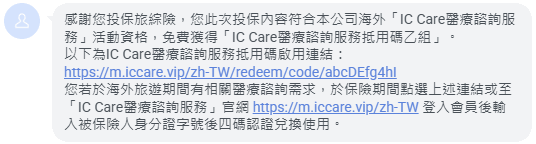
若您透過保險活動取得的抵用碼有兌換連結,但透過連結無法成功進行兌換,可能與您的裝置預設瀏覽器有關,您也可以透過手動輸入抵用碼的方式進行兌換,抵用碼為連結後方的英文數字共10碼,以下圖為例,抵用碼為「abcDEfg4hI」,請再點選畫面上的「兌換抵用碼」,輸入抵用碼進行兌換。
IC Care VIP member
Q What services are included in VIP Exclusive Services?
VIP Exclusive Services offer the following exclusive services: medication delivery, medication consultation, and VIP private clinic services.
If you wish to use these services after your consultation, you can select the service you need from the screen displayed at the end of your consultation, and you will be automatically guided through the process. Or, you can go directly to the homepage, click on "VIP Exclusive Services," choose the service category you need, fill out the necessary information, and submit it. We will then arrange for a specialist to provide the service.
Q How can I upgrade to IC Care VIP if I am a regular member?
Go to "My account"→"Basic Info"→"View plans", select IC Care VIP.
Q How is the IC Care VIP membership period calculated? When does it start?
The IC Care VIP membership is activated when the user pays the membership fee, and the one-year membership service period begins from that date.
Q 在會籍內購買的使用次數,VIP會籍結束是否仍然可以使用?
The consultation sessions purchased during the VIP membership period will remain valid even after the VIP membership ends. You can continue to use these purchased consultation sessions after your VIP membership expires.
Even if your VIP membership expires, you can still use the additional (purchased) consultation sessions thereafter.
Q 一年時間內沒有使用服務可以進行退款嗎?
According to our policy, if you do not use the services within the membership period, we cannot provide a refund.
Our services are considered activated once purchased, and the rights to the various exclusive services of IC Care VIP membership are simultaneously provided. Therefore, if you do not use the services within the membership period, we cannot issue a refund. If you have any other questions or need further clarification on our policy, please feel free to contact our customer support.
Family Group Feature
Q What is the family group feature? How can I share it with my family?
IC Care VIP members enjoy the family group feature,allowing one IC Care VIP member to create up to 4 sub-accounts for family members.,讓您的家人們共同享有 IC Care VIP 的所有專屬功能,包含24小時緊急諮詢服務次數、藥物寄送、藥物諮詢、特診服務。
Additionally, the family group feature includes a proxy system, allowing family members to assist those who are less familiar with the services or have difficulty navigating the system in booking appointments. You can also share consultation links, enabling family members to join video consultations. This ensures that even if family members live in different locations, they can still accompany each other during medical consultations.代理人系統,家庭成員可以代理那些對服務不太熟悉或操作有困難的家人進行預約諮詢。甚至可以透過share a consultation link,讓家庭成員進入視訊診間,即使與家人不同住一地,也可以實現陪家人諮詢的需求。
Q How do I create a family member account?
Once you activate your IC Care VIP membership, the「Family Group」 feature will appear in the 「My account」, with your role designated as the "Family Group Administrator."
- Add a Family Member Account: Click 「Add member」, The administrator can either create a new account for a family member or invite an existing account. For invitations to specific accounts, the invited user will receive a notification when they log in. Once they click「Accept」, they will join the family group.
- Set Up a Proxy: Click 「Settings」 →「Proxy Settings」, then choose the member who will act as a proxy for the selected family member. The administrator can assist all members with scheduling, but assigning another member as a proxy grants them the same scheduling rights.
- Edit Family Member Information: Click 「Settings」 for a specific member to edit their basic information. You can also reset their account password here.
- Remove a Family Member: Click「Settings」 → 「Remove Member」 for the selected member to end their relationship with the family group.
Q What is consultation link sharing?
When you are in the consultation room waiting for the doctor, a consultation link sharing feature is available below the video window. Family members who receive this link can click on it to join your current consultation. Here’s how you can share it:
- Via Messaging Apps: Copy the video consultation link and paste it to the family member who needs to join the consultation.
- Click Social Account Icon: This will open the chosen social account, follow the steps to select the family member's social account, and send the link. The recipient can click the link to join the consultation.
- Click SMS: Enter the phone number, and the consultation link will be sent via personal SMS (additional charges may apply depending on the user's telecom plan).
Please note that prescriptions will be issued based on the account information of the consultation participant. Ensure that the correct patient's name is selected as the consultation participant.
Q How do I schedule a consultation for my family members?
Here are several ways you can help family members schedule and attend consultations:
- If you and your family are in the same location and want to use your device for the consultation:
Log into your IC Care main account, and on the main screen, select your family member's account as the consultation participant. You can then act on behalf of the family member's subaccount for the consultation. - If Your Family Member Is in a Different Location and Has Their Own Device:
Ask your family members to log in to their account and schedule the consultation themselves. (The Group Administrator must first set up the family member’s account in the Family Group feature.) - If Your Family Member Is in a Different Location and Has Difficulty Scheduling:
Log into your IC Care main account, select your family member's account as the consultation participant, and enter the consultation room with the doctor. Click on "Copy Consultation Link" at the top to copy the consultation link and send it to your family member. The family member can click the link to join the video consultation. - If Your Family Member Is a MinorWhen scheduling a consultation for a minor, a prompt will appear requiring the Group Administrator’s consent. The administrator must log in, refresh the main screen, and approve the request in the dialog box. Once approved, the minor’s account can proceed to the consultation room.
Reminder: Prescriptions will be issued under the name of the selected consultant. Always use the correct family member’s account for scheduling and share the link with the intended participant.
Privacy & Security
Q Does IC Care have security measures in place?
We take information security very seriously. At IC Care, we have invested significant resources in ensuring data security to protect our users’ information from potential risks. If you would like to learn more about the specific measures we have implemented, please refer to our
如果您想了解我們為了資安採取的具體措施,請參考我們的Internet Security Zone.
Q Does IC Care share users' personal data with anyone other than third-party service providers?
No, please refer to our Privacy Policy.
IC Care collects, processes, and uses users' personal data in accordance with the "Personal Data Protection Act" and only within the necessary scope for specific purposes. IC Care will not provide users' personal data to anyone other than third-party service providers.
The purposes of collecting, processing, and using personal data are solely for providing IC Care platform services.
Although the specific purposes of collecting, processing, using, and retaining users' personal data include marketing, it is only for the promotion of IC Care platform services and does not involve commercial transactions or profit with any third party other than service providers.